


Australia's cyber threat environment has never been more urgent. The Australian Signals Directorate’s (ASD) Australian Cyber Security Centre (ACSC) received over 84,700 cybercrime reports in the 2024-25 financial year. That's a cybercrime reported every six minutes, with the average cost per report surging by 50% for businesses, reaching $80,850. For large businesses, the picture is even grimmer: average losses skyrocketed by 219% to $202,700.
If your organisation does not yet have a structured cybersecurity strategy, the question is no longer if you will be targeted. It's when. The good news is that Australia has a nationally recognised, clearly defined framework to help you get started: The Essential Eight.
What is the Essential Eight?
The Essential Eight is a set of baseline cybersecurity mitigation strategies developed by the ASD through its ACSC. First published as part of ASD's broader Strategies to Mitigate Cyber Security Incidents, the Essential Eight comprises the eight controls assessed as most effective at protecting organisations against the most common and impactful cyber threats.
The framework is relevant to organisations of all sizes, from small businesses to large enterprises and government agencies. Essential Eight Maturity Level 2 is mandatory for all Australian non-corporate Commonwealth entities subject to the PGPA (Public Governance, Performance, and Accountability) Act, and strongly recommended for private-sector organisations seeking to demonstrate cyber resilience.
What is the Essential Eight framework?
The Essential Eight is a risk-based framework that groups eight mitigation strategies that, when implemented together, significantly reduce the attack surface of an organisation. The strategies are designed to:
- Prevent cyberattacks from succeeding in the first place.
- Limit the extent of damage if an attack does occur.
- Enable recovery of data and systems after an incident.
The framework is underpinned by a Maturity Level that allows organisations to progressively strengthen their security posture based on their risk profile and capability.
What are the 8 strategies in the Essential Eight?
- Application Control.
Application Control (formerly Application Whitelisting in the pre-2023 framework) prevents unauthorised software, including malware, from executing on your systems. Only approved and known applications are permitted to run. This is one of the most effective defences against malicious code and ransomware. - Application Patching.
Keeping applications up to date with security patches is one of the most fundamental and most overlooked cybersecurity practices. Unpatched software is a primary entry point for attackers. The Essential Eight recommends patching internet-facing services within 48 hours of a critical vulnerability being identified, and all other applications within two weeks. - Operating System Patching.
Like application patching, keeping operating systems up to date is critical. The Essential Eight advises patching internet-facing operating systems within 48 hours of a critical vulnerability and all others within one month. Organisations should also be actively replacing end-of-life operating systems. - Restriction of Administrative Privileges.
The principle of least privilege applies here: users and systems should have only the access they need to do their jobs. Administrative privileges must be validated, regularly reviewed, and minimised. Privileged accounts should not be used for day-to-day activities. - Configuration of Office Macros.
Macros embedded in Office documents are a common delivery mechanism for malware. The Essential Eight recommends disabling macros from the internet by default and only allowing macros from trusted, verified sources. - User Application Hardening.
This strategy involves configuring applications, particularly web browsers and productivity software, to remove or disable features that are not needed and commonly exploited, such as Flash, Java, and web advertisements from untrusted sources. - Multi-factor Authentication.
MFA adds a critical layer of identity verification beyond a username and password. With credential theft a leading cause of breaches, requiring a second authentication factor, such as a phone prompt, biometric, or hardware token, dramatically reduces account compromise risk. - Review Backups.
Backups protect organisations from data loss caused by ransomware, accidental deletion, or system failure. The Essential Eight recommends backing up important data, software, and configuration settings regularly, storing backups offline or off-site, and regularly testing that data can be restored.
What is the Essential Eight Maturity Model?
One of the Essential Eight's most useful features is its Maturity Model, which provides a clear progression path for organisations at different stages of their cybersecurity journey. These controls are mapped to Maturity Levels zero to three, guiding organisations from basic to advanced cybersecurity readiness.
Maturity Level Zero (ML0) — Ad Hoc / Not Started.
The organisation has not yet begun implementing the relevant control, or the control is applied inconsistently. There are significant weaknesses that could be exploited by even relatively unsophisticated attackers.
Maturity Level One (ML1) — Partially Aligned.
Basic hygiene measures are in place, designed to protect against opportunistic and commodity-level threats. Organisations at ML1 have addressed the most obvious vulnerabilities but still have meaningful gaps against more targeted attacks.
Maturity Level Two (ML2) — Mostly Aligned.
Controls are more mature and consistently applied, providing protection against moderately sophisticated threats. ML2 is the mandatory baseline for Australian Government entities under the PSPF, and is strongly recommended as a target for most private sector organisations.
Maturity Level Three (ML3) — Fully Aligned.
The highest maturity level, ML3 provides resilience against targeted, sophisticated adversaries, including state-sponsored actors. Controls are deeply embedded, consistently monitored, and regularly reviewed. Privileged access workstations, phishing-resistant MFA, and fully validated application control are among the requirements at this level.
You can read the Essential Eight maturity models here, published by the ASD, for further information.
Which level should your organisation target?
Most private-sector organisations should aim for at least ML2 as a baseline. Organisations in critical infrastructure, financial services, government supply chains, or healthcare should consider ML3, particularly given the significant increase in targeted attacks documented in the 2024-25 ACSC report.
Can Microsoft 365 help to meet Essential Eight requirements?
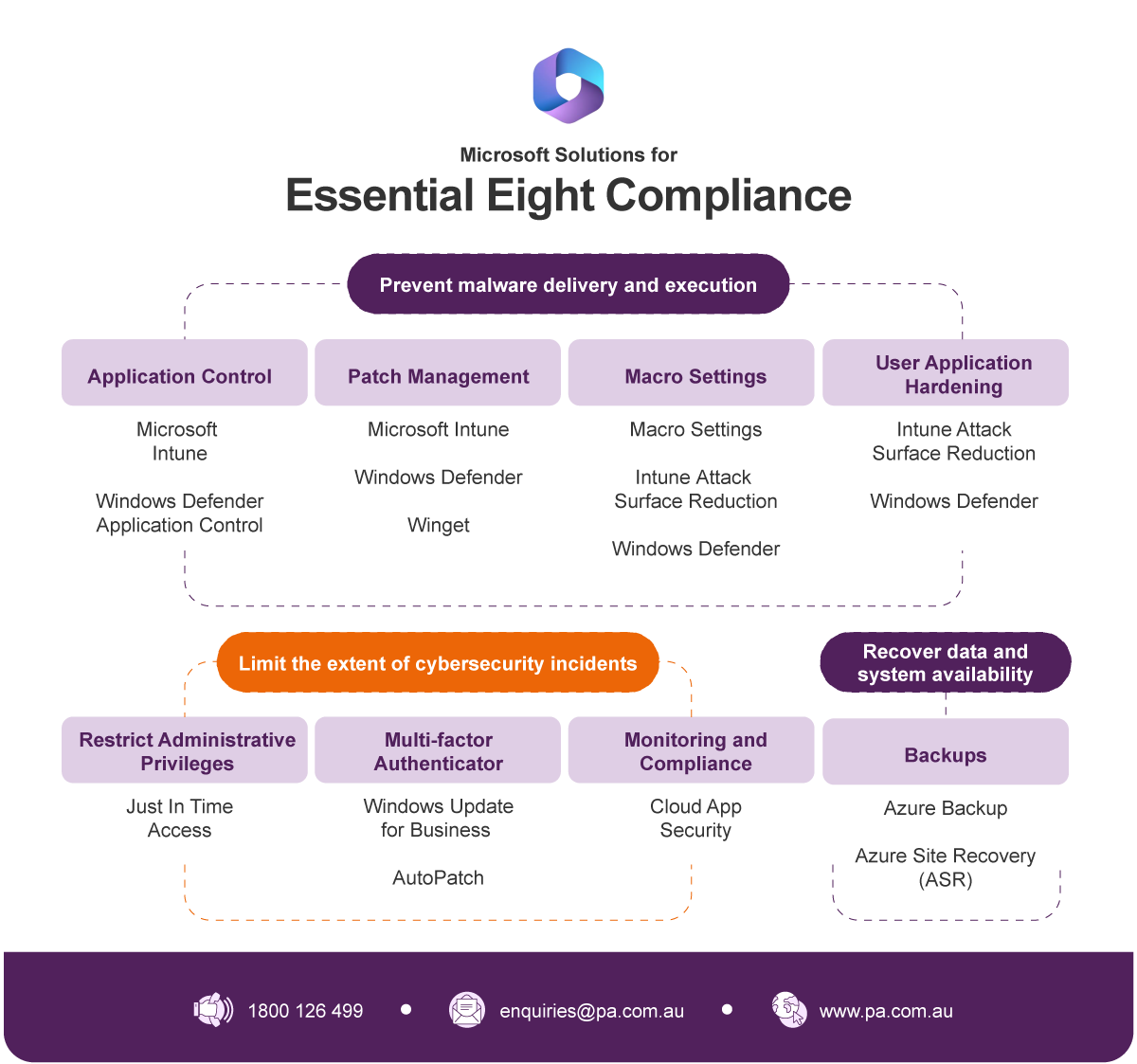
The short answer is yes. Microsoft 365 provides a rich set of native security tools that directly support the Essential Eight, and Microsoft has published detailed guidance that maps M365 capabilities to each control and maturity level.
Here is how key Microsoft 365 tools align to the Essential Eight:
- Application Control — Microsoft Intune and Windows Defender Application Control (WDAC) enable organisations to define and enforce which applications are permitted to run across managed devices.
- Patch Management — Windows Update for Business and Microsoft Intune enable centralised, automated management of application and OS patches, with built-in compliance reporting. Microsoft recommends using Microsoft Purview Compliance Manager to stay continually compliant and prevent compliance drift.
- Macro Settings — Microsoft Intune policies can block macros from untrusted sources across all Microsoft 365 Apps, meeting requirements across all maturity levels.
- User Application Hardening — Attack Surface Reduction (ASR) rules via Microsoft Defender for Endpoint allow organisations to restrict dangerous application behaviours at scale.
- Restrict Administrative Privileges — Microsoft Entra ID (formerly Azure AD) Privileged Identity Management (PIM), Conditional Access policies, and Entitlement Management enable granular, just-in-time privileged access control.
- MFA — Microsoft Entra's authentication policies support the full spectrum of MFA methods required at each maturity level, from standard push notifications at ML1 through to phishing-resistant methods such as FIDO2 security keys and Windows Hello for Business at ML3.
- Backups — Microsoft 365's built-in retention, redundancy, and backup capabilities, combined with third-party backup solutions, support data recovery requirements.
- Monitoring and Compliance — Purview Compliance Manager: Essential Eight Premium templates are available across all three maturity levels to automate and support monitoring, continuous assessment, and configuration drift management.
Full functionality is available with Microsoft 365 Business Premium or Enterprise E5. Many organisations are already closer to Essential Eight compliance than they realise. They simply need the right partner to help them map their existing licensing to the framework and close the gaps.
Take the next step
The 2024-25 Annual Cyber Threat Report is a call to action. With cybercrime reported every six minutes in Australia and attack costs continuing to climb, the Essential Eight provides a practical, proven path to improving your organisation's cyber resilience, using tools you may already own.
Professional Advantage specialises in helping Australian organisations assess their current Essential Eight maturity, map their Microsoft 365 licensing to the framework, and build a roadmap to their target maturity level.
Watch our Essential Eight webinar: Cybersecurity from the Server Room to the Boardroom to see how your existing Microsoft products and licensing can be used to achieve your desired maturity level and how to communicate your security posture to your board with confidence.
You can also call us on 1800 126 499 to speak with one of our security specialists.



Write a Comment